ChatGPT의 광고
hackernews
|
|
💼 비즈니스
#chatgpt
#openai
#tip
#광고
#꿀팁
원문 출처: hackernews · Genesis Park에서 요약 및 분석
요약
OpenAI는 2026년 2월 9일부터 미국 내 무료(Free) 및 Go 플랜 사용자를 대상으로 챗GPT에 광고 표시를 시작하는 테스트를 진행합니다. 광고는 대화 응답 하단에 명확히 구분되어 나타나며, 광고주의 개입 없이 독립적인 시스템을 통해 운영되어 사용자의 답변에 영향을 주지 않습니다. 사용자는 민감한 주제의 대화에서 광고를 볼 수 없으며, 설정을 통해 광고 개인화를 해제하거나 데이터를 삭제할 수 있습니다. 유료 구독 플랜 사용자에게는 광고가 게재되지 않으며, 무료 사용자도 기능 사용 제한을 감수하는 조건으로 광고 없는 환경을 선택할 수 있습니다.
본문
[](https://help.openai.com/en) LanguageEnglishUnited States [Login](https://help.openai.com/auth/login?returnTo=%2Fen%2Farticles%2F20001047-ads-in-chatgpt) 1. [All Collections](https://help.openai.com/en) 2. Ads in ChatGPT # Ads in ChatGPT Updated: 15 days ago Ads are currently only being tested in the US and may change as testing expands. We’re beginning to test ads in ChatGPT in the US. Ads may appear for # **General FAQs** ## **Why are you testing ads in ChatGPT?** ChatGPT is used by hundreds of millions of people for learning, work, and everyday decisions. Keeping the Free and Go plans fast and reliable requires significant infrastructure and ongoing investment. Ads can help support broader access to ChatGPT and continued investment in the product—without changing how ChatGPT works or what users expect from the experience. ## **When will ads be available in ChatGPT?** We’re beginning this test in the US on February 9, 2026. We’re taking a deliberate, phased approach and will expand gradually as we learn from real-world use and feedback. If you’re eligible for the test, you’ll see clear in-product information. ## **Who will see ads?** We’re beginning to test ads in ChatGPT in the US. Ads may appear for users on the Free and Go plans. Plus, Pro, Business, Enterprise, and Edu accounts will not have ads. During our test, we will not show ads in accounts where the user tells us or we predict that they are under 18. For logged-out users, we have designed the experience to show ads that are appropriate for all ages since we do not have age information. ## **Will Plus, Pro, Business, Enterprise, and Edu accounts have ads?** No. Plus, Pro, Business, Enterprise, and Edu accounts will not have ads. ## **Do ads influence the answers ChatGPT gives me?** No. Ads do not influence ChatGPT’s answers. Ads run on separate systems from our chat model, and advertisers have no ability to shape, rank, or alter ChatGPT’s responses. Ads are separate and clearly labeled. Ads are paid placements, and seeing an ad doesn’t mean OpenAI endorses or recommends the advertiser or its products or services. ## **When and where do ads appear?** Ads can appear below the end of a response. Ads are clearly labeled as sponsored and visually separated from ChatGPT’s response. During this test, ads do **not** appear: * In Temporary Chats * When you’re logged out * After you generate an image * In the ChatGPT Atlas browser We’ll share updates if this changes. 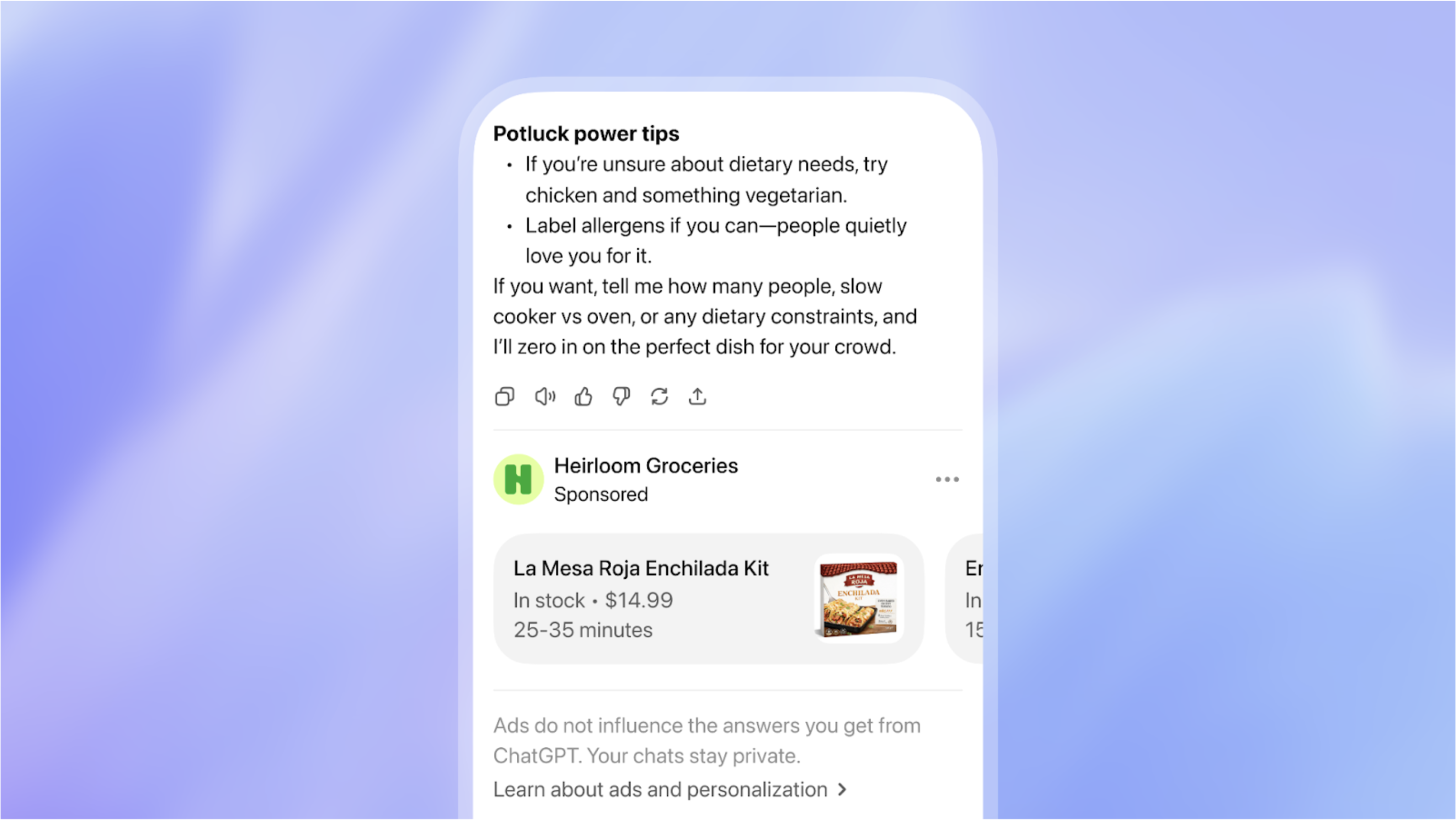 ## **How do you decide which ad to show?** We start with what’s being discussed in your current chat thread and match those topics to relevant ads submitted by advertisers. If you choose personalized ads, we may also use additional signals—like past chats and how you’ve interacted with ads—to make ads more relevant over time. ## **How are ads ranked?** If there are multiple eligible advertisers, we’ll select the one that is most relevant to your chat to show first. ## **How many ads will I see at a time?** During the test, you may see a single ad unit below a ChatGPT response when there’s a relevant match to your chat. That unit may feature one or more items from an advertiser. For longer conversations, we also consider overall context and user experience. ## **Do you share my conversations with advertisers?** No. We do not share your conversations with ChatGPT with advertisers, and we never sell your data to advertisers. Advertisers do not have access to your chats, chat history, memories, or personal details. Advertisers only receive aggregated, non-identifying information about how their ads perform, such as total views or clicks. If you choose to message an advertiser through an ad (for example, to ask questions while making a purchase decision), the advertiser will only see the messages you send them directly. ## [**Can I control my ads experience?**](https://chatgpt.com/#settings/Advertising) Yes. You can control your ads experience, including whether your ads are personalized. **Ad controls are available in Settings > Ad Controls or visit **[**_this link_**](http://chatgpt.com/#settings/Advertising)**on web or iOS.** You can: * Turn off ad personalization at any time * Dismiss ads and share feedback * See why you’re being shown a particular ad * Clear data used for ads at any time If you turn off ads personalization, you will still see ads based on the context of your current chat thread, but we won't use other chat threads, ads history or interests to inform the ads we show you. Ad controls are only available for Free and Go users in the US. Plus, Pro, Enterprise and Edu plans are ad-free and do not include ad controls. If you do not see Ads controls on your mobile app, please update to the latest version. 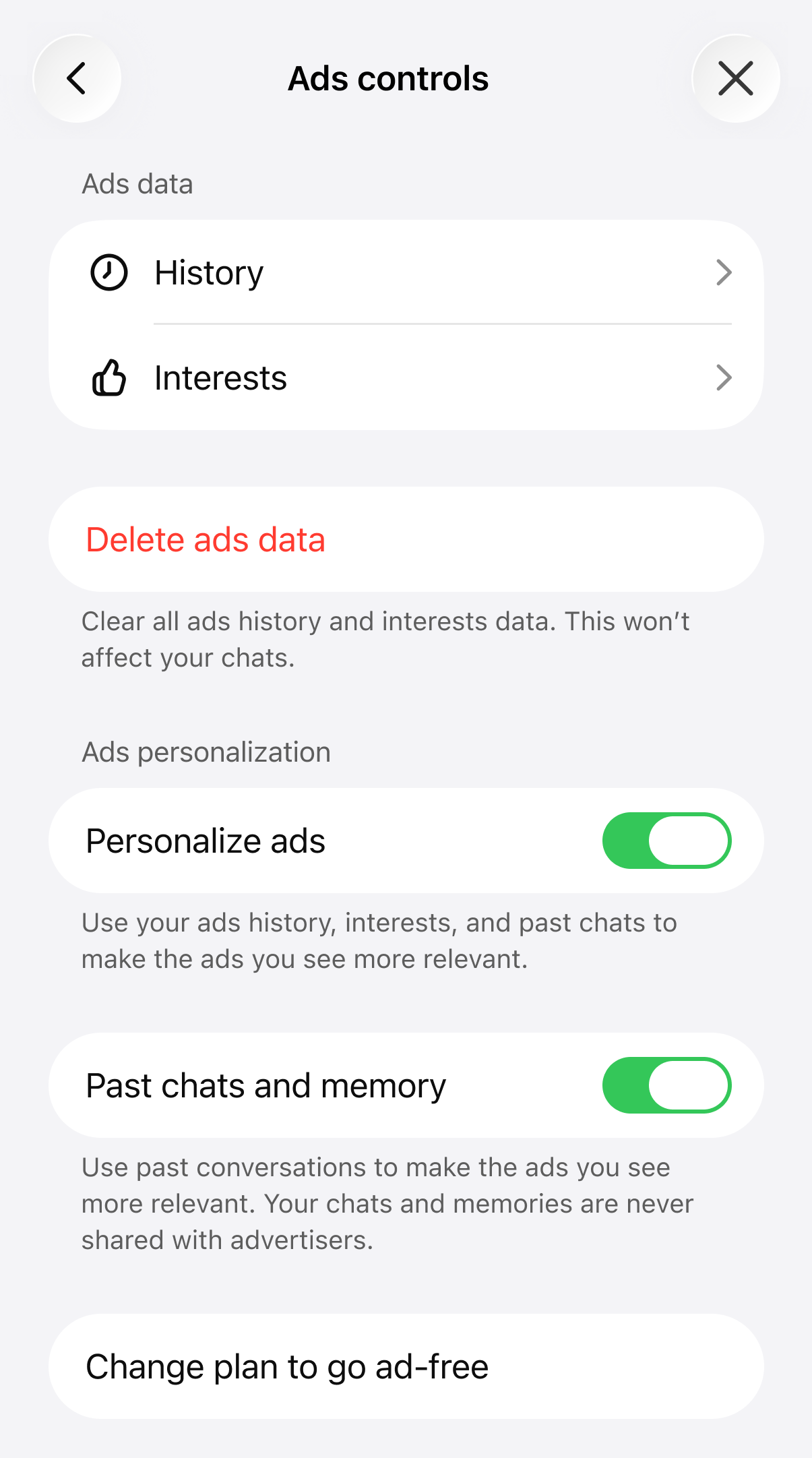 ## **Are memories and past chats used to personalize the ads I see?** Starting in February, if ads personalization is turned on, ads will be personalized based on your chats and any context ChatGPT uses to respond to you. If memory is on, ChatGPT may save and use memories and reference recent chats when selecting an ad. You can manage your memory controls and ad personalization at any time in Settings. To chat without using or updating memory, use Temporary Chat. Learn more how memories work and how to control them [_here_](https://help.openai.com/en/articles/8590148-memory-faq). ## **Do my interactions with ads affect my ChatGPT memories?** No. Actions like hiding, reporting, viewing, or clicking an ad do not get added to your ChatGPT memory. If you share an ad with ChatGPT via the “Ask ChatGPT” feature and ask questions about it, that conversation can be referenced in future chats if you have the “reference chat history” setting enabled. ## **Will ads appear in sensitive or regulated chats?** No. Ads are not eligible to appear near sensitive or regulated topics, including health, mental health, or politics. ## **Will I see sensitive or regulated ads?** No. Advertisers in sensitive or regulated verticals such as dating, health, financial services, or politics are excluded from advertising on ChatGPT at this time. ## **Will minors see ads?** Ads do not appear in accounts where someone tells us—or we predict—they are under 18. ## **Will ads appear in Temporary Chats?** Temporary Chats will not show ads. ## **Will there be a way to not see ads?** Yes. You can reduce or avoid ads in a few ways: * Upgrade to an ad-free subscription plan (Plus or Pro) * Choose a free, no-ads option with additional limits (fewer messages per day and no access to tools like images) Availability may vary by region and over time. ## **Can I ask ChatGPT about the ad I’m seeing?** By default, ChatGPT can’t see the ads shown to you. If you’d like to ask about a specific ad, tap the three-dot menu on the ad and select **Ask ChatGPT**. This shares the ad with ChatGPT so it can answer questions about it. Advertisers do not influence ChatGPT’s responses about ads that are shared in the chat. ## **What information is shared with advertisers?** For this early test, advertisers receive aggregated reporting such as views and clicks. We may explore additional measurement insights over time while continuing to protect user privacy. ## **What user signals can be used to show ads? What is not used?** Ads are shown using information that stays within ChatGPT to help make ads relevant and is not shared with advertisers. Depending your your settings, this can include: * What you’re discussing in your current chat thread * Basic context such as general location or language If you have Personalized Ads enabled, starting in February 2026 this can also include: * Your current chat thread, including personalized model responses * How you interact with ads (for example, ads you hide or engage with) * Past chats and memory Advertisers never receive your chats, chat history, memories, name, email, precise location, IP address, or sensitive information (such as health, mental health, political topics). ## **How long is ads data retained, and what happens if I clear it?** If you delete your ads data, it’s no longer used to show you ads. That data is retained for up to 30 days before being removed from our servers. ## **How can I report or hide an ad?** Tap the three-dot menu on an ad: * Use **Hide ad** if it isn’t relevant or you don’t want to see ads in that conversation. Hiding removes it from view and helps improve relevance. * Use **Report ad** if you believe it’s misleading, unsafe, inappropriate, or violates our policies. Reporting hides the ad and sends it to our team for review. ## **What are OpenAI’s principles for advertising in ChatGPT?** People trust ChatGPT for important and personal tasks. As we introduce ads, we’re guided by principles designed to preserve user trust: * **Mission alignment:** Advertising supports our mission by helping make AI more accessible. * **Answer independence:** Ads do not influence answers. Ads are separate and clearly labeled. * **Conversation privacy:** We keep conversations private from advertisers, and we never sell user data. * **Choice and control:** You control ad personalization and can clear ads data at any time. We’ll always offer a way to avoid ads, including ad-free paid tiers and a free no-ads option with additional limits. * **Long-term value:** We don’t optimize for time spent. We prioritize user trust and user experience over revenue. You can read all our principles here:[ _https://openai.com/index/our-approach-to-advertising-and-expanding-access/_](https://openai.com/index/our-approach-to-advertising-and-expanding-access/) ## **I’m interested in advertising on ChatGPT. How can I learn more?** We’re focused on learning from early testing. If you’re a business interested in advertising in ChatGPT, you can submit your interest at [**openai.com/advertisers**](https://openai.com/advertisers/) to stay informed. # **Ads-Free on the ChatGPT Free plan** If you’re on the **Free** plan and prefer not to see ads, you can switch to an **Ads-Free** experience. This removes ads, but comes with **lower usage limits** and **reduced feature access** (for example, fewer messages and no access to some tools like image generation or deep research). If you want an ad-free experience **without** the reduced Free limits, you can upgrade to **Plus** or **Pro**. Ads (and Ads-Free controls) may only appear in regions where ads are being tested. If you’re not eligible for the ads test, you may not see these options. ## **How to switch to Ads-Free** * Open **Settings** in ChatGPT. * Select **Ads controls**. * Tap **Change plan to go ad-free**. * Choose **Reduce message limits** (this removes ads for free). * Confirm the change. You’ll see a prompt that explains the tradeoff: **ads allow for more access** , while **going ads-free on Free lowers your message limits**. (Wording may vary by platform.) ## **What changes on Ads-Free** When you switch to Ads-Free, you should expect: * **No ads** * **Lower usage limits** (you may hit rate limits more often) * **Reduced feature access** (some tools may be unavailable, such as image generation or deep research) If you hit a limit, ChatGPT may show a banner with options to: * **Upgrade** (to Plus or Pro), or * **Show ads** (switch back to the ad-supported Free experience for more access) ## **How to switch back to the ad-supported Free experience** You have two options: * From the rate-limit banner, tap **Show ads**. * From **Settings → Ads controls** , use the plan option to return to the ad-supported Free experience (wording may vary by platform). ## [**Ads controls**](https://chatgpt.com/#settings/Advertising)**(if you choose to see ads)** If you’re on the ad-supported Free experience, [**_Ads controls_**](https://chatgpt.com/#settings/Advertising) lets you manage how ads work for you. Depending on your region and eligibility, you may be able to: * **View History and Interests -** See ads you’ve viewed or interacted with, and the interests used to make ads more relevant. * **Delete ads data -** Clears ads history and interests data (this does **not** affect your chats). After deletion, it may take up to **30 days** to fully remove from our systems. * Toggle **Personalize ads -** Turning personalization off can make ads less tailored, but it **doesn’t remove ads**. * Toggle **Past chats and memory -** If enabled, past chats and memory can contribute to ad relevance. If disabled, ads rely more on your current chat thread. When an ad appears, you can also use the **three-dot menu** on the ad to: * **Hide ad** (if it’s not relevant) * **Report ad** (if it seems misleading, unsafe, or inappropriate) * Select **About this ad** (to learn why you’re seeing it) * Select **Ask ChatGPT** (to share that specific ad in-chat—by default, ChatGPT can’t see the ads shown to you) ### **Does Ads-Free change how ChatGPT answers?** No. ChatGPT responses are generated independently. Ads are not integrated into responses. ### **Are ads endorsements?** No. Ads are paid placements, and seeing an ad doesn’t mean OpenAI endorses or recommends the advertiser or its products or services. ### **Do advertisers see my chats or memories?** No. Advertisers do not see your chats, chat history, memories, or personal details. We only share aggregated ad performance data (such as total views or clicks). ### **Is turning off ad personalization the same as going Ads-Free?** No. Turning off personalization changes how ads are selected. **Ads-Free removes ads** (and reduces your Free usage limits). ### **I’m on a Go plan—can I use Ads-Free?** Ads-Free is a **Free-plan** option. If you’re on a paid plan, you’d need to switch back to Free to use it, or upgrade to a plan that’s already ad-free (like Plus or Pro). ## Was this article helpful? Submit * [General FAQs](https://help.openai.com/en/articles/20001047-ads-in-chatgpt#general-faqs) * [Why are you testing ads in ChatGPT?](https://help.openai.com/en/articles/20001047-ads-in-chatgpt#why-are-you-testing-ads-in-chatgpt) * [When will ads be available in ChatGPT?](https://help.openai.com/en/articles/20001047-ads-in-chatgpt#when-will-ads-be-available-in-chatgpt) * [Who will see ads?](https://help.openai.com/en/articles/20001047-ads-in-chatgpt#who-will-see-ads) * [Will Plus, Pro, Business, Enterprise, and Edu accounts have ads?](https://help.openai.com/en/articles/20001047-ads-in-chatgpt#will-plus-pro-business-enterprise-and-edu-accounts-have-ads) * [Do ads influence the answers ChatGPT gives me?](https://help.openai.com/en/articles/20001047-ads-in-chatgpt#do-ads-influence-the-answers-chatgpt-gives-
Genesis Park 편집팀이 AI를 활용하여 작성한 분석입니다. 원문은 출처 링크를 통해 확인할 수 있습니다.
공유